Fire TV Stick vs Roku Streaming Stick — Which Should You Buy?
May 11, 2026· Updated May 19, 2026
Cutting the cord is easier than ever, but choosing the right streaming stick can feel overwhelming. Two names dominate the market: Amazon Fire TV and Roku. Both deliver 4K content, voice control, and access to thousands of apps—but they take very different approaches to how you watch.
This comparison is for cord-cutters who want the best value without sacrificing features. Whether you’re deep in the Amazon ecosystem or prefer a more neutral platform, we’ll break down exactly where each stick shines—and where it falls short.
The Contenders
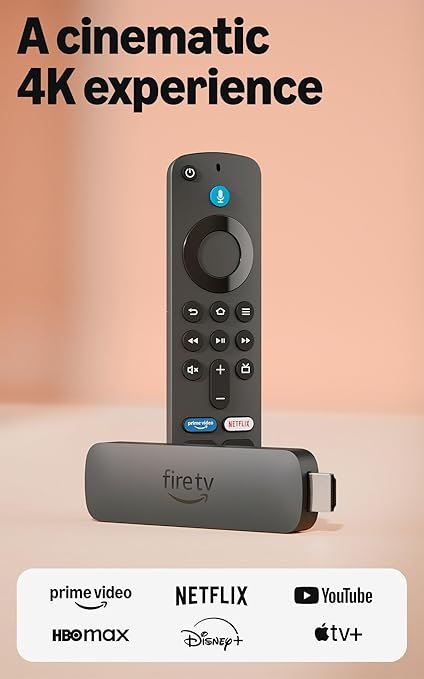
Amazon Fire TV Stick 4K
Amazon’s powerhouse streaming stick delivers stunning 4K visuals with Dolby Vision and Atmos for cinematic sound quality. Wi-Fi 6 support ensures smooth streaming even when your network is crowded with connected devices.
Best For: Amazon Prime Members & Alexa Users
Deep Alexa voice control and smart home integration
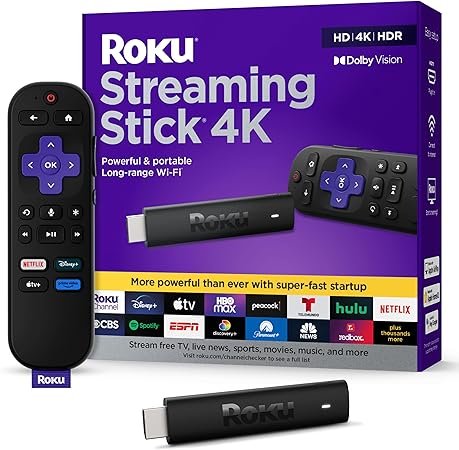
The Roku Streaming Stick 4K comes in at $39.99, while the Amazon Fire TV Stick 4K costs $49.99. That $10 difference buys you Wi-Fi 6 support and deeper smart home integration with Fire TV. However, Roku’s lower price makes it the better value if you don’t need Alexa’s advanced features or already have a stable Wi-Fi 5 network.
✓ Roku wins on pure upfront value
Content Library
Both sticks support all major streaming apps—Netflix, Hulu, Disney+, HBO Max, YouTube, and more. The difference is in presentation. Fire TV prioritizes Amazon Prime Video content on the home screen, which can feel pushy if you’re not a Prime member. Roku takes a neutral approach, treating all services equally and letting you customize your home screen with your favorite apps. Roku also offers The Roku Channel with thousands of free movies and shows, plus live TV options.
✓ Roku wins on content neutrality and free options
Voice Control & Smart Home
This is where Amazon Fire TV pulls ahead dramatically. Alexa integration is seamless—you can control smart lights, check your Ring doorbell, view security cameras, and even order pizza without leaving your show. Voice search is accurate, and hands-free mode lets you talk to Alexa without pressing a button. Roku supports voice search and basic commands through its remote, but it doesn’t integrate with smart home ecosystems nearly as deeply. If you’re already invested in Alexa devices, Fire TV is the obvious choice.
✓ Amazon Fire TV wins on voice control and smart home
Picture Quality
Both sticks deliver excellent 4K streaming with HDR support. Fire TV Stick 4K supports Dolby Vision, HDR10+, and Dolby Atmos for premium audio—ideal if you have a compatible TV and sound system. Roku Streaming Stick 4K also supports Dolby Vision and Dolby Atmos, so picture and sound quality are essentially tied. The Fire TV’s Wi-Fi 6 support may give it a slight edge in maintaining consistent quality on busy networks, but in real-world use, most people won’t notice a difference.
✓ Tie—both deliver stunning 4K with HDR
Ease of Use
Roku has long been praised for its simple, intuitive interface—it’s consistently ranked as the easiest streaming platform for beginners and older users. The home screen is clean, search works across all apps, and setup takes about five minutes. Fire TV has improved significantly in recent years, but its interface can feel cluttered with ads and Prime Video promotions. Roku also offers private listening through its mobile app, letting you plug in headphones to your phone instead of disturbing others—a feature Fire TV lacks.
✓ Roku wins on simplicity and ease of use
So which streaming stick should you buy? If you’re an Amazon Prime member or already use Alexa devices throughout your home, the Fire TV Stick 4K is the smarter choice—its ecosystem integration and Wi-Fi 6 support justify the extra $10. But if you want a neutral platform that’s easy to use and treats all streaming services equally, the Roku Streaming Stick 4K delivers better value at a lower price. Both are excellent streaming sticks—your decision comes down to whether you prioritize smart home control or content flexibility.